FREE SHIPPING On Orders Over US$200
Every device connected to an IP network needs an address before it can communicate with other devices. That address may be configured manually, assigned automatically by DHCP or allocated through another mechanism such as IPv6 SLAAC.
For a laptop or smartphone, automatic addressing is normally the simplest choice. A server, printer, surveillance camera or network switch, however, may need a predictable address so that users and management systems can always locate it.
This leads to a common question:
Should a device use DHCP or a static IP address?
In most networks, the best answer is not to choose one method exclusively. DHCP is usually used for client devices, while static addresses or DHCP reservations are used for infrastructure and services that must remain reachable at a consistent address.
This guide explains how each method works, their advantages and limitations, and how to select the right addressing strategy.
Quick Comparison: DHCP vs. Static IP
| Feature | DHCP | Static IP |
|---|---|---|
| Address assignment | Automatically assigned by a DHCP server | Manually configured or permanently assigned |
| Configuration effort | Low | Higher |
| Centralized management | Yes | Limited with manual configuration |
| Address consistency | May change unless reserved | Remains fixed |
| Best suited for | Laptops, phones, guest devices and general clients | Servers, printers, cameras and network infrastructure |
| Risk of configuration errors | Lower | Higher if managed manually |
| Scalability | Excellent | Difficult at large scale |
| Remote access | May require DDNS or reservation | Easier when a consistent address is required |
| Typical enterprise approach | Used for most endpoints | Used selectively for critical devices |
What Is a Static IP Address?

A static IP address is an address that remains assigned to the same device rather than being selected dynamically from a changing pool.
Within a local network, a static IP address may be established in two ways:
- Manual static configuration
The address, subnet mask, default gateway and DNS servers are entered directly on the device. - DHCP reservation
The DHCP server is configured to assign the same address whenever it recognizes a particular device.
A static address can be either private or public.
Private Static IP Address
A private static IP is used inside a local network.
Examples include:
192.168.1.1010.0.0.20172.16.10.5
Private addresses are commonly assigned to:
- Routers and firewalls
- Managed Ethernet switches
- Wireless access points
- File servers
- DNS and DHCP servers
- Network printers
- IP cameras
- Network storage devices
- Building-control systems
Public Static IP Address
A public static IP is normally assigned by an internet service provider to a customer’s internet connection.
It may be useful for:
- Hosting internet-facing services
- Site-to-site VPNs
- Remote-access gateways
- Allowlisting by external systems
- Mail servers
- Business applications that require a fixed source address
A public static IP is different from a static private address configured inside a LAN. Many discussions of DHCP and static IP become confusing because these two concepts are treated as though they were the same.
What Is DHCP?

DHCP stands for Dynamic Host Configuration Protocol.
It automatically provides network configuration information to connected devices. Depending on the DHCP server configuration, this information can include:
- IP address
- Subnet mask
- Default gateway
- DNS server addresses
- Lease duration
- Domain name
- Network boot information
- Time server information
- Other device-specific options
The DHCP service may run on:
- A router
- A firewall
- A Layer 3 switch
- A Windows or Linux server
- A cloud-managed network platform
- A dedicated network appliance
When a device joins the network, it requests configuration from the DHCP server instead of requiring an administrator to enter the settings manually.
How Does DHCP Work?
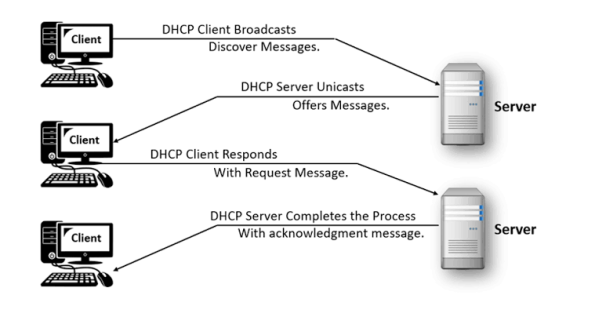
The basic IPv4 DHCP process is often described as DORA:
1. Discover
The client broadcasts a DHCP Discover message to locate an available DHCP server.
2. Offer
A DHCP server responds with an available IP address and related network settings.
3. Request
The client requests the offered address.
4. Acknowledge
The server confirms the assignment and provides the lease information.
The client can then communicate on the network.
A DHCP address is leased for a defined period. Before the lease expires, the client normally attempts to renew it. If the renewal succeeds, the device may continue using the same address.
For this reason, a dynamic IP address does not necessarily change every time a device reconnects. It simply is not guaranteed to remain permanently assigned unless a reservation has been configured.
What Is a DHCP Lease?
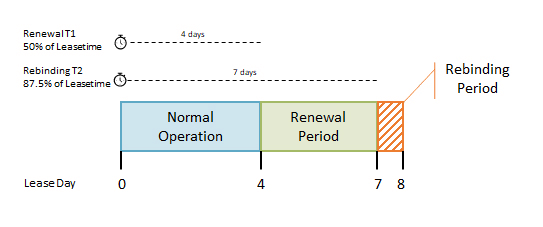
A DHCP lease defines how long a client may use an assigned address.
For example, a DHCP server may issue an address for:
- One hour
- Eight hours
- One day
- One week
- Another administrator-defined period
Short lease periods can be useful in guest networks where devices connect and disconnect frequently. Longer lease periods can reduce DHCP traffic and address changes in stable office networks.
When the lease ends, the address returns to the available pool if the client no longer needs it.
Advantages of DHCP
1. Faster Device Configuration
A DHCP-enabled device can normally join the network without requiring the user to enter an IP address, gateway or DNS server manually.
This is especially useful for:
- Employee laptops
- Smartphones
- Tablets
- Guest devices
- Temporary workstations
- Internet of Things devices
- Large-scale endpoint deployments
2. Centralized Address Management
Administrators can manage address pools, lease durations, gateways and DNS settings from one location.
When a DNS server or gateway changes, the administrator can update the DHCP configuration instead of manually modifying every endpoint.
3. Fewer Address Conflicts
A properly configured DHCP server tracks address allocation and avoids assigning the same address to multiple clients.
Manual static addressing is more vulnerable to duplicate IP assignments, especially when documentation is incomplete.
4. Better Scalability
Configuring ten devices manually may be manageable. Configuring hundreds or thousands of devices individually is inefficient and difficult to audit.
DHCP makes it easier to expand the network without substantially increasing configuration workload.
5. Easier Moves and Changes
A DHCP client can move between different subnets or offices and receive settings appropriate to the new network.
A device with manually configured addressing may fail to connect after being moved unless its settings are changed.
Limitations of DHCP
1. The Address May Change
A dynamically assigned address is not guaranteed to remain permanently associated with a device.
This can be a problem when users, monitoring systems or applications connect directly to the device by IP address.
2. DHCP Service Availability Matters
If the DHCP server becomes unavailable, new clients may be unable to obtain valid network settings.
Existing clients may continue operating until their leases expire, but network access can eventually be affected.
Critical networks should therefore use resilient DHCP services or redundant server configurations.
3. Rogue DHCP Servers Can Cause Problems
An unauthorized DHCP server may provide clients with an incorrect gateway or DNS server.
This can cause:
- Loss of connectivity
- Traffic redirection
- Man-in-the-middle attacks
- DNS manipulation
- Network instability
Enterprise switches can reduce this risk through features such as DHCP snooping, port security, VLAN segmentation and access control.
4. Direct Device Access May Be Less Predictable
If a printer or camera receives a different address, saved bookmarks, management software and monitoring platforms may no longer find it.
This issue is usually resolved with DHCP reservation or DNS-based device naming.
Advantages of Static IP Addressing
1. Predictable Device Location
A device remains available at a known address.
This is useful for:
- Servers
- Printers
- Firewalls
- Managed switches
- IP cameras
- Access control systems
- Storage appliances
- Industrial controllers
2. Easier Service Hosting
Services that other systems must reach consistently are easier to configure when the destination address does not change.
Examples include:
- Web services
- File sharing
- VPN gateways
- Network monitoring
- Database services
- Remote management
- Backup systems
3. Clear Infrastructure Design
Static addressing allows administrators to create structured address plans.
For example:
.1for the gateway.2–.20for network infrastructure.21–.50for servers.51–.100for printers and appliances- Remaining addresses for DHCP clients
A documented plan can make troubleshooting and maintenance more efficient.
4. Independence From DHCP for Critical Functions
A manually configured server can continue using its address even if the DHCP service fails.
This may be important for devices that provide DHCP, DNS, routing or authentication services to the rest of the network.
Limitations of Static IP Addressing
1. More Manual Work
Each device must be configured individually unless automation or centralized configuration management is used.
The administrator must enter the correct:
- IP address
- Subnet mask or prefix length
- Default gateway
- DNS servers
2. Greater Risk of Human Error
Incorrect settings can result in:
- Duplicate IP addresses
- Incorrect subnet masks
- Wrong gateways
- Unreachable DNS servers
- Devices placed on the wrong subnet
3. More Difficult to Scale
As a network grows, manually tracking every address becomes increasingly complex.
An accurate IP address management system is essential in larger environments.
4. Less Portable
A statically configured laptop may work in one office but fail when connected to another network using a different subnet.
Static addressing is therefore usually unsuitable for mobile user devices.
DHCP Reservation: A Practical Middle Ground
A DHCP reservation allows a DHCP server to assign the same IP address to a specific device each time it connects.
The reservation is commonly associated with the device’s MAC address or another client identifier.
This approach combines several benefits:
- The device receives a predictable IP address.
- Configuration remains centrally managed.
- Gateway and DNS changes can be distributed automatically.
- The address is protected from assignment to another client.
- Administrators can review fixed assignments in one place.
- The device can remain configured as a DHCP client.
DHCP reservations are often appropriate for:
- Network printers
- IP cameras
- Wireless access points
- VoIP phones
- Building-management devices
- Small servers
- Network-attached storage
- Test equipment
- Managed switches in smaller networks
However, devices that provide the DHCP service itself generally require manually configured addresses or another highly controlled addressing method.
DHCP vs. Static IP: Detailed Comparison
Configuration
DHCP:
Minimal endpoint configuration is required. The client obtains its network settings automatically.
Static IP:
Every network parameter must be configured correctly on the device or through an automation platform.
Management
DHCP:
Address pools and network settings can be controlled centrally.
Static IP:
Manual assignments require accurate documentation and ongoing IP address management.
Reliability
DHCP:
Reliable when the DHCP service is properly designed and available. Critical environments may require redundant DHCP servers.
Static IP:
The device retains its configuration independently, but an incorrect manual setting can cause persistent connectivity problems.
Flexibility
DHCP:
Well suited to networks where devices frequently join, leave or move between locations.
Static IP:
Well suited to stable infrastructure that must remain at a predictable address.
Scalability
DHCP:
Efficient for hundreds or thousands of endpoints.
Static IP:
Becomes difficult to manage at scale without automation and an IP address management platform.
Cost
DHCP:
Usually reduces administrative labor. Most business routers and network platforms already include DHCP functionality.
Static IP:
Does not necessarily require additional hardware, but manual configuration and troubleshooting can increase operational cost.
Security
Neither DHCP nor static addressing is inherently secure or insecure.
Security depends more heavily on:
- Firewall rules
- Network segmentation
- Authentication
- Switch access controls
- Endpoint security
- Patch management
- Encryption
- Monitoring
- Proper device configuration
DHCP can be attacked through rogue servers or address exhaustion. Static devices can also be targeted if exposed or poorly protected.
Addressing method should not be treated as a replacement for network security controls.
Which Devices Should Use DHCP?
DHCP is generally the best choice for devices that do not need a permanently predictable address.
Typical examples include:
- Desktop computers
- Employee laptops
- Smartphones
- Tablets
- Guest devices
- Temporary workstations
- General office endpoints
- Consumer smart devices
These devices benefit from automatic configuration and may move between different networks.
Which Devices Should Use a Static IP or Reservation?
A fixed address is useful when other devices or applications must consistently locate the endpoint.
Common examples include:
- Routers
- Firewalls
- DHCP servers
- DNS servers
- Domain controllers
- File servers
- Network printers
- Managed switches
- Wireless controllers
- IP cameras
- Network storage
- Monitoring servers
- Industrial equipment
- Remote-access gateways
Whether the address should be manually configured or reserved through DHCP depends on the device role and network-management strategy.
Static IP or DHCP Reservation: Which Is Better?
Use a manual static IP when:
- The device must operate before DHCP is available.
- The device provides DHCP, routing or core DNS services.
- The equipment does not support DHCP reliably.
- Operational policy requires local fixed configuration.
- The address must remain independent of the DHCP platform.
Use a DHCP reservation when:
- The device needs a consistent address.
- Centralized management is preferred.
- DNS and gateway settings may change.
- The device is not part of the network’s core addressing infrastructure.
- Administrators want to avoid manual endpoint configuration.
For many printers, access points, cameras and appliances, DHCP reservation is the more manageable option.
Does a Static IP Improve Network Speed?
No. A static IP address does not inherently increase bandwidth, reduce latency or improve optical transmission performance.
DHCP is used primarily when the device joins the network or renews its lease. Once the address is assigned, normal network traffic is not slower simply because DHCP was used.
Network performance depends on factors such as:
- Link speed
- Switch capacity
- Routing
- Cabling quality
- Wireless signal strength
- Congestion
- Server performance
- Latency
- Packet loss
The choice between DHCP and static IP should be based on manageability and accessibility, not speed.
Does a Dynamic IP Improve Security?
Not by itself.
Changing an IP address may make some forms of unsophisticated tracking less convenient, but it does not provide meaningful protection against most network threats.
An attacker may still identify a device through:
- Network scanning
- DNS records
- Application vulnerabilities
- User credentials
- Malware
- Exposed services
- Cloud account compromise
Similarly, a static IP is not unsafe merely because it remains constant.
Effective protection requires firewalls, secure authentication, software updates, access controls and continuous monitoring.
DHCP and Static Public IPs for Remote Access
Remote access introduces an additional distinction between private and public addressing.
A static private IP ensures that a device remains reachable from other devices on the same LAN.
A static public IP ensures that the organization’s internet-facing address remains consistent.
Remote access may also require:
- A VPN
- Firewall rules
- NAT configuration
- Port forwarding
- Access-control policies
- Multi-factor authentication
- A public DNS record
When the public IP changes, Dynamic DNS can update a domain name so that it continues pointing to the current address.
However, DDNS does not replace proper security. Directly exposing device-management interfaces to the internet is generally less secure than using a controlled VPN or zero-trust access service.
A Note About IPv6
IPv6 networks may use several address-assignment methods:
- Manual static addressing
- DHCPv6
- Stateless Address Autoconfiguration
- Router Advertisements
- Combinations of these methods
A device may automatically create an IPv6 address without using a traditional DHCPv4-style process.
For this reason, IPv6 address planning should be considered separately from IPv4 DHCP configuration.
Common Configuration Mistakes
Placing Static Addresses Inside the DHCP Pool
A manually configured device may use an address that the DHCP server later assigns to another client.
To avoid conflicts, static addresses should be excluded from the dynamic pool or explicitly reserved.
Using an Incorrect Default Gateway
A device may communicate within the local subnet but fail to reach other networks if the gateway is incorrect.
Entering the Wrong Subnet Mask
An incorrect subnet mask can cause the device to treat remote addresses as local, or local addresses as remote.
Forgetting DNS Configuration
A device may reach services by IP address but fail to resolve domain names when DNS settings are missing or incorrect.
Configuring Core Infrastructure With Uncontrolled DHCP
A router, switch or server may become difficult to locate if its management address changes unexpectedly.
Assuming DHCP Always Changes the Address
A device may receive the same address repeatedly because the lease is renewed or the DHCP server remembers the previous assignment. The address is dynamic because it is not guaranteed, not because it constantly changes.
Treating IP Assignment as a Security Control
Changing between static and dynamic addressing does not replace segmentation, access control or firewall protection.
How to Choose the Right Addressing Method
Ask the following questions for each device:
Does the Device Need a Predictable Address?
Use a static address or reservation when users, applications or monitoring systems must consistently reach it.
Does the Device Move Between Networks?
Use DHCP for laptops, phones and other mobile clients.
Is the Device Part of Core Network Infrastructure?
A manually configured static address may be appropriate for routers, firewalls and DHCP servers.
How Large Is the Network?
The larger the network, the more valuable centralized DHCP and IP address management become.
Can the DHCP Service Be Made Redundant?
Critical environments should avoid depending on a single DHCP server without backup or failover.
Will the Device Be Accessed Remotely?
A consistent private address may be required internally. Remote access from the internet may also require a static public IP, DDNS, VPN and firewall configuration.
Who Will Maintain the Network?
DHCP reduces manual workload, while static configurations require accurate documentation and greater administrative discipline.
Recommended Addressing Strategy
For most business and enterprise networks, a practical design is:
- Use DHCP for laptops, desktops, phones and guest devices.
- Use DHCP reservations for printers, cameras, access points and appliances.
- Use manually configured addresses for core routers, firewalls and critical infrastructure services.
- Keep manually assigned addresses outside the DHCP pool.
- Maintain accurate documentation or an IP address management system.
- Use DNS names instead of hard-coded IP addresses where practical.
- Configure redundant DHCP services for critical environments.
- Protect DHCP with switch security features and network segmentation.
This hybrid approach provides automation without sacrificing predictability.
Frequently Asked Questions
Is DHCP better than static IP?
DHCP is better for most client devices because it simplifies configuration and management. Static addressing is better for devices that must remain available at a predictable address.
Most networks should use both methods.
Can a server use DHCP?
Yes, particularly when a DHCP reservation guarantees a consistent address. Core infrastructure servers may still use manually configured addresses depending on operational policy.
Can a printer use DHCP?
Yes, but a reservation is recommended so that computers and print servers can consistently locate it.
Does DHCP require a dedicated server?
Not necessarily. DHCP may run on a router, firewall, switch, server or network appliance.
Can two devices have the same static IP?
They can be configured with the same address accidentally, but this creates an IP conflict and disrupts communication. Every active device on the same subnet must have a unique address.
Does rebooting change a DHCP address?
Not always. The client may renew the existing lease and receive the same address. A different address is possible but not guaranteed.
Is a static IP required for remote access?
Not always. Dynamic DNS can map a domain name to a changing public IP. A static public IP is still useful when consistent allowlisting, VPN configuration or service hosting is required.
Conclusion
DHCP and static IP addressing solve different network-management problems.
DHCP automates configuration, reduces administrative workload and scales efficiently across large numbers of client devices. Static addressing provides predictability for servers, printers, network equipment and services that must remain reachable at a consistent address.
For many devices, DHCP reservation offers the best balance: the endpoint receives a stable address while administrators retain centralized control over network settings.
A well-designed network normally uses a combination of all three approaches:
- Dynamic DHCP assignments for general clients
- DHCP reservations for devices requiring stable addresses
- Manual static addresses for core infrastructure
The correct strategy depends on device role, network size, operational requirements, remote-access needs and the organization’s ability to manage addressing consistently.
Reliable IP planning should also be supported by properly designed switching, routing and fiber connectivity. Fiber-Life provides fiber optic connectivity products for data centers, enterprise networks, telecommunications systems and other network infrastructure applications.