FREE SHIPPING On Orders Over US$200
A fiber inspection microscope helps reveal contamination and visible damage on connector end faces. But higher magnification alone does not make a microscope the right choice. It must also fit your connectors, reach the surface being inspected and provide any records your work requires.
Before buying, start with the inspection task rather than the magnification number.
1. Identify What You Need to Inspect
Inspecting a loose patch cord is different from inspecting a connector behind a patch-panel adapter.
For accessible patch-cord ends, a handheld microscope with the correct adapter can be a practical option. For connectors inside panels or equipment ports, you generally need a probe-style microscope with a suitable inspection tip.
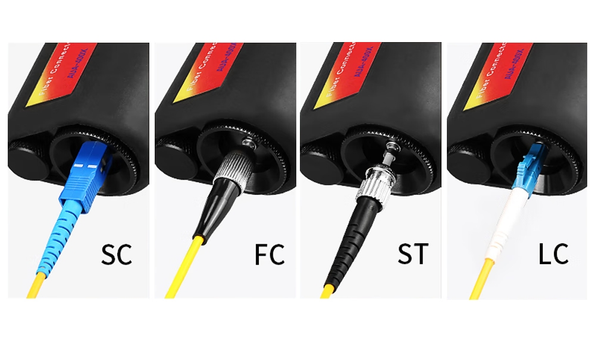
Check three details before choosing:
- Connector format: Confirm support for the LC, SC, FC or other connectors you use.
- End-face polish: Verify that the inspection adapter or tip supports the intended PC/UPC or APC connector.
- Physical access: Make sure the tool can reach the connector, particularly in recessed or crowded ports.
Ask which adapters are included. A product described as compatible with several connector types may require separately purchased accessories.
For MPO/MTP connectors, confirm support for multifiber inspection. A standard single-fiber adapter is not sufficient.
2. Choose Magnification Without Overlooking Image Quality
A common question is whether to buy a 200x or 400x fiber microscope. The answer depends on what you need to observe and how well the complete optical system performs.
200x magnification can be suitable for routine visual inspection when the microscope provides enough detail for the task. 400x magnification offers greater enlargement, but it does not automatically provide twice the useful detail.
Lens quality, illumination and focus all affect what you can distinguish. With otherwise comparable optics, higher magnification also generally provides a smaller field of view.
When evaluating a microscope, look for:
- A sharply focused image of the end face.
- Even illumination without distracting glare.
- Enough field of view to examine the required area.
- Sufficient detail for your inspection criteria.
Request sample images or a demonstration where possible. Avoid relying on a simple rule such as “200x for multimode and 400x for single-mode.” Fiber type alone does not determine the appropriate microscope.
3. Decide Whether Visual Inspection Is Enough
Once you have confirmed access and image quality, consider how the results will be used.
An eyepiece microscope may suit work that requires a direct visual check. If you need to share images, document connector condition or produce customer reports, look for a video inspection system with those specific capabilities.
| Inspection need | What to look for |
|---|---|
| Visual checks of loose patch cords | Suitable adapters, clear optics and comfortable focusing |
| Inspection through panel or equipment adapters | A probe with compatible tips and adequate reach |
| Before-and-after cleaning images | Image capture, storage and export functions |
| Customer inspection records | Reporting software and connector identification |
| Automated pass/fail results | Supported analysis criteria and the correct connector profiles |
Do not assume every video microscope includes automatic analysis. Displaying an image, saving it and evaluating it against acceptance criteria are separate functions.
If a project specifies IEC 61300-3-35 or another inspection requirement, confirm that the equipment and inspection procedure meet the applicable criteria. A magnification rating alone does not establish compliance.
4. Check Everyday Usability and Safety
For repeated inspections, practical details matter. Check whether the focus control is easy to use, the instrument is comfortable to hold and replacement adapters are available. Confirm the battery type and any external display or software requirements.
The microscope should also fit into a straightforward inspect–clean–inspect workflow: inspect the end face, clean it if needed, then inspect again before connecting.
For an eyepiece microscope, disconnect the fiber from active optical sources and verify that it is not carrying optical power before inspection. Never look into a potentially live fiber through the microscope. A built-in safety filter does not make every energized connection safe to inspect.
Remember that inspection evaluates the visible condition of the end face. It does not measure link loss or confirm overall network performance.
5. Compare the Available Product Configurations
For accessible patch-cord inspection, Fiber-Life offers a 200x Handheld Fiber Inspection Microscope and a 400x Handheld Fiber Inspection Microscope.
Before ordering, confirm the available magnification settings, connector adapters and accessories supplied with the selected configuration. If you work with several connector formats, list them in your inquiry so compatibility can be checked.
For equipment-port inspection, saved images or automated assessment, verify those functions separately. They should not be assumed from the product name or magnification.
Conclusion
The right fiber inspection microscope lets you access the connector, see the required detail and document the result when necessary. Start with those needs, then compare magnification and practical features.
This approach helps you choose equipment that suits your inspection work and includes the accessories needed to use it.