FREE SHIPPING On Orders Over US$200
Red light reaching the end of a fiber is a useful sign, but it does not prove that the connection is ready for service. A visual fault locator (VFL) helps trace fibers and locate some visible faults. Knowing what its light reveals—and what it cannot confirm—is essential for deciding what to check next.
This guide walks through the testing process and explains how to interpret common results.
1. Visual Fault Locator Prepare Before Connecting
Identify the fiber you intend to test. If it carries live service, arrange an approved interruption before disconnecting it from active optical equipment at both ends.
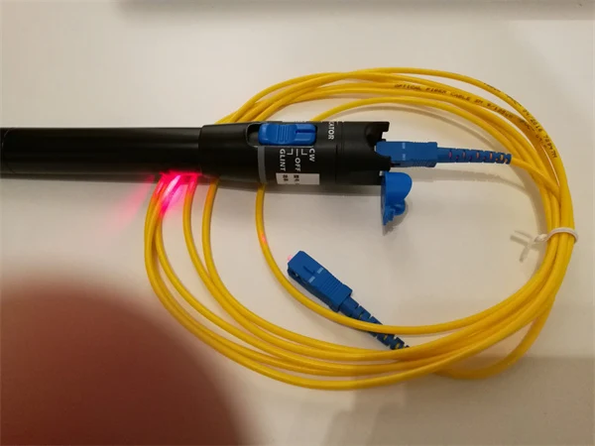
Prepare your VFL, connector-cleaning tools and any required adapters. Then check the following:
- Connector compatibility: Many VFLs use a 2.5 mm interface for connectors such as SC, ST and FC. LC connectors generally need a suitable 1.25 mm adapter or compatible test lead. Confirm compatibility with the specific device.
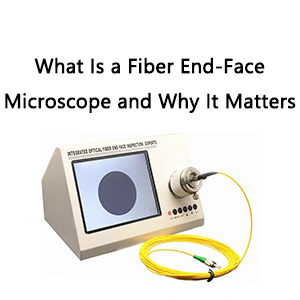
- Connector condition: With the fiber disconnected from active equipment, inspect the end faces, clean them if necessary and inspect again before connecting.
- Device controls: Check the batteries and identify the continuous-light and flashing modes, if available.
Never look into the VFL output or a fiber connector, including through an optical microscope. Follow the device’s laser-safety instructions and keep exposed outputs directed away from people.
2. Connect and Test the Fiber
Once preparation is complete, follow a consistent sequence.
Step 1: Connect with the VFL switched off
Attach the fiber using the correct interface or adapter. Seat the connector securely without forcing it. Do not assume that a connector is compatible simply because it appears to fit.
Step 2: Switch on the test light
Activate the VFL according to its instructions. Continuous mode produces a steady indication; flashing mode can help distinguish the test light from surrounding light.
Step 3: Identify the far end
At the expected far-end connector, use a white card to observe the emitted light indirectly. Keep the connector pointed away from eyes and do not look into the ferrule.
Confirm that the light appears at the expected destination before investigating the cable route.
Step 4: Examine accessible sections
Look for localized light leakage along exposed sections and around accessible connection points. Pay attention to tight bends or visibly damaged areas.
Do not deliberately bend the cable to make light appear. Keep it within the manufacturer’s bend-radius limits.
Step 5: Switch off before changing connections
Turn off the VFL before disconnecting, cleaning or moving to another fiber. Record the fiber identification and any suspect locations, then replace protective caps when testing is complete.
3. Interpret the Results
Treat each observation as a clue rather than a complete diagnosis.
| What you observe | What it may mean | What to check next |
|---|---|---|
| Light reaches the expected far end | A visible-light path exists through the fiber | Confirm labeling, then perform the required loss test |
| Light appears at a different port | The route or labeling may differ from expectations | Verify the connection before changing it |
| A localized bright spot appears along the cable | A tight bend or damaged section may be leaking light | Check routing and visible damage; replace a damaged patch cord or arrange fiber repair |
| No light is visible at the far end | A break, excessive loss, incorrect route or test-setup problem may be present | Check the batteries, connections, fiber identity and device range before concluding that the fiber is broken |
Glow near the VFL connection does not automatically indicate damage. Strong light at the output can be visible around the connector even when no fault is present.
Likewise, brightness alone cannot tell you the amount of optical loss. Light reaching the far end indicates continuity at the VFL’s wavelength, but it does not confirm acceptable link loss or network performance.
4. Recognize the Limits of Visual Testing
There is no single testing distance that applies to every visual fault locator. Usable range depends on the device, fiber path, connection losses and viewing conditions.
It is also important to distinguish between light reaching the far end and light being visible at a fault along the route.
Dark or opaque cable jackets can hide leakage. Cables inside conduits or enclosed trays may be impossible to inspect visually. Therefore, seeing no bright spot does not rule out a fault.
A VFL does not measure insertion loss or provide a numerical distance to a break. Its role is to help identify the fiber and investigate visible problems.
5. Choose the Next Action
Your next step should follow the evidence from the test.
- If you find an excessive bend: Correct the routing within the cable’s specified limits, then retest. Persistent problems may require repair or replacement.
- If a connection needs attention: Switch off the VFL before inspecting, cleaning or reconnecting it. Keep the test fiber disconnected from active equipment.
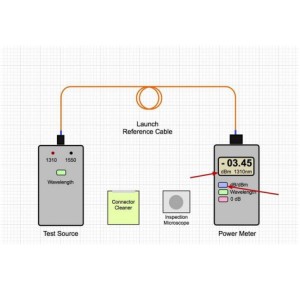
- If light passes through but the link still fails: Use a suitable light source and power meter, or an optical loss test set, to measure link loss.
- If the suspected fault is hidden: An appropriately configured OTDR can help locate and characterize events along the fiber.
After a repair, complete the measurements required for the installation. The disappearance of visible leakage alone is not proof that the link meets its performance requirements.
Conclusion
A visual fault locator helps you trace fibers and investigate visible faults, provided you interpret the results carefully. Connect it correctly, check the accessible fiber path and use further measurements when the observation cannot explain the problem.
For a suitable testing tool, explore Fiber-Life’s Visual Fault Locators. Before ordering, confirm the connector interface, required adapters and specified operating conditions against your application.