FREE SHIPPING On Orders Over US$200
When comparing Ethernet cables, specifications such as 100 MHz, 250 MHz, 500 MHz, and 2000 MHz frequently appear alongside familiar network speeds such as 1 Gbps, 10 Gbps, and 40 Gbps.
This often leads to several questions:
- Does a higher MHz rating mean faster Ethernet?
- Is cable frequency the same as network bandwidth?
- Can a higher-frequency cable transmit data over a longer distance?
- Will replacing a Cat5e cable with Cat8 automatically improve internet speed?
The answer is more nuanced than simply “higher is better.”
Cable frequency is an important performance specification, but it is only one part of an Ethernet link. The actual connection speed also depends on the Ethernet standard, network equipment, signal encoding, cable length, installation quality, connectors, interference, and the performance of the complete channel.
This guide explains what Ethernet cable frequency means, how it relates to data rate and transmission distance, and how to select the appropriate cable category for a network.
What Is Ethernet Cable Frequency?
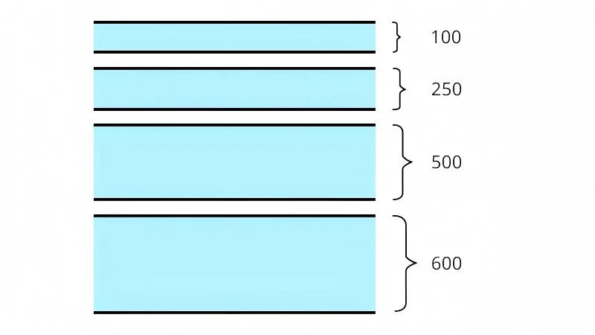
Ethernet cable frequency describes the range of electrical signal frequencies that a balanced twisted-pair cable is designed and tested to carry while meeting specified performance limits.
It is measured in megahertz, or MHz:
- 1 Hz means one cycle per second.
- 1 MHz means one million cycles per second.
For example, Category 6 cabling is characterized up to 250 MHz, while Category 6A is characterized up to 500 MHz.
This does not mean that a Cat6 cable transfers exactly 250 million bits per second, or that a Cat6A cable transfers exactly 500 million bits per second. MHz measures signal frequency; Mbps and Gbps measure data rate. They describe related but fundamentally different properties.
A useful analogy is a roadway:
- Cable frequency is similar to the usable design capacity of the road.
- Data rate is the amount of traffic successfully transported.
- Signal encoding is comparable to how efficiently vehicles use each lane.
- Crosstalk, attenuation, and interference are comparable to congestion and road conditions.
A road with greater capacity can support more traffic, but the actual traffic flow still depends on the vehicles, rules, intersections, and overall route.
MHz vs. Mbps: What Is the Difference?
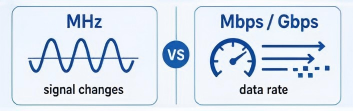
Although MHz and Mbps are often described together, they are not interchangeable.
MHz Measures Signal Frequency
MHz describes how rapidly an electrical signal changes or cycles. In structured cabling, it is used to define the upper frequency to which a cable category or channel is characterized and tested.
Mbps and Gbps Measure Data Rate
Mbps means megabits per second, while Gbps means gigabits per second. These units describe how much digital information a network can transfer each second.
Modern Ethernet systems use advanced modulation and encoding techniques to carry multiple bits of information through each signal interval. They may also transmit simultaneously over all four twisted pairs.
As a result, a 100 MHz Cat5e cable can support 1000BASE-T at 1 Gbps. The frequency rating and data rate do not need to have the same numerical value. Fluke Networks notes that MHz describes the physical signal, whereas Mbits describes throughput achieved by the electronics, software, and transmission medium working together.
Does Higher Cable Frequency Mean Faster Ethernet?
A higher cable-frequency rating generally provides more signal bandwidth and performance headroom, but it does not guarantee that a network will operate at a higher speed.
For example:
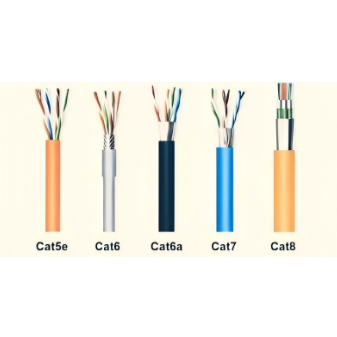
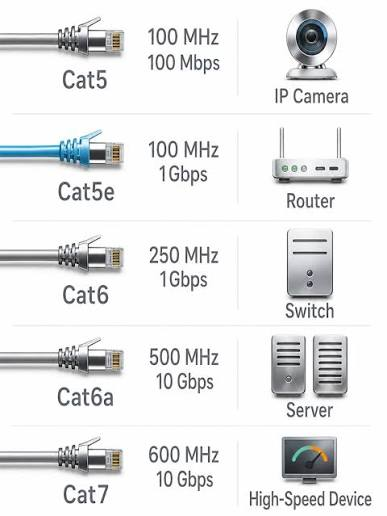
- Cat5e is characterized up to 100 MHz and normally supports 1GBASE-T over a 100-meter channel.
- Cat6 is characterized up to 250 MHz and supports 1GBASE-T over 100 meters, with limited-distance support for 10GBASE-T.
- Cat6A is characterized up to 500 MHz and supports 10GBASE-T over a 100-meter channel.
- Cat8 is characterized up to 2000 MHz and is intended for 25GBASE-T and 40GBASE-T channels of up to 30 meters.
However, installing a Cat8 cable between two 1 Gbps devices will not create a 40 Gbps connection. Both network interfaces, switches, routers, transceivers, and the complete cabling channel must support the target Ethernet standard.
The negotiated link rate will be limited by the capabilities of the connected equipment and the quality of the entire channel, not by the printed MHz rating alone.
Does Higher Frequency Increase Transmission Distance?
No. A higher frequency does not inherently allow an Ethernet signal to travel farther.
In copper cabling, insertion loss generally increases as:
- Cable length increases
- Signal frequency increases
- Conductor diameter decreases
- Cable temperature rises
Higher-frequency signals are also more sensitive to insertion loss, return loss, crosstalk, connector quality, and installation defects.
Higher-category cables can support faster Ethernet because they are designed to meet more demanding electrical performance requirements. Depending on the category, this may involve:
- Tighter pair twisting
- Better pair-to-pair isolation
- Improved conductor geometry
- Internal separators
- Shielding
- More stringent insertion-loss limits
- Better return-loss performance
- Stronger control of near-end and far-end crosstalk
- Better protection against alien crosstalk from adjacent cables
Therefore, Cat6A can carry 10GBASE-T for 100 meters not simply because it is rated to 500 MHz, but because the complete Cat6A cabling system is engineered to control the impairments that become critical at those frequencies.
Ethernet Cable Categories, Frequencies, Speeds, and Distances
| Cable category | Specified frequency | Commonly supported Ethernet applications | Maximum standard channel distance | Important notes |
|---|---|---|---|---|
| Cat5 | 100 MHz | 10BASE-T and 100BASE-TX | 100 m | Obsolete and no longer recognized for new structured cabling installations |
| Cat5e | 100 MHz | 10/100/1000BASE-T | 100 m | May support 2.5GBASE-T or 5GBASE-T when the installed link meets the applicable requirements |
| Cat6 | 250 MHz | 10/100/1000BASE-T | 100 m | Can support 10GBASE-T over reduced distances, typically around 35–55 m depending on the installation and alien crosstalk |
| Cat6A | 500 MHz | Up to 10GBASE-T | 100 m | Commonly preferred for new commercial horizontal cabling requiring 10G capability |
| Category 7 / Class F | 600 MHz | Up to 10GBASE-T | 100 m | Defined in the ISO/IEC system but not recognized as a TIA cabling category |
| Cat8 | 2000 MHz | 25GBASE-T and 40GBASE-T | 30 m | Intended primarily for short data-center equipment connections |
Fluke Networks’ category comparison lists Cat5e at 100 MHz, Cat6 at 250 MHz, Cat6A at 500 MHz, Category 7 at 600 MHz, and Cat8 at 2000 MHz. It also identifies Cat8 as a short-reach cabling system for 25/40GBASE-T applications of up to 30 meters.
A Note About Cat5
Cat5 and Cat5e are not the same category.
Original Cat5 cabling was associated primarily with 100 Mbps Ethernet. Cat5e introduced improved crosstalk requirements and became the recognized minimum category for reliable 1000BASE-T structured cabling.
Cat5 is now obsolete and is no longer recognized in current commercial cabling standards. Existing cable labeled Cat5 should not automatically be treated as equivalent to Cat5e.
A Note About Cat6 at 10 Gbps
Cat6 reliably supports 1 Gbps over a standard 100-meter channel. It may also support 10GBASE-T over a shorter channel.
The frequently quoted maximum is approximately 55 meters, but achievable distance depends strongly on alien crosstalk, cable bundling, installation conditions, connectors, and the actual performance of the installed link. Some certification guidance uses a more conservative distance of approximately 35 meters without additional qualification. IEEE development material also considered a 55-meter Category 6 channel model for 10GBASE-T.
For a new installation that requires 10 Gbps over the full 100-meter channel, Cat6A is the more appropriate specification.
A Note About Cat7
Category 7 components and Class F channels are defined under ISO/IEC cabling standards and are characterized up to 600 MHz.
However, Cat7 was never officially adopted as a category by the North American TIA cabling standards. Class F systems have also traditionally used shielded connector interfaces and system designs that may differ from ordinary TIA-style RJ45 installations.
Consequently, buyers should be cautious with inexpensive online products marketed as “Cat7 RJ45 cables.” The label alone does not prove that the cable forms a certified ISO Class F channel.
A Note About Cat8
Cat8 is characterized up to 2000 MHz and is designed primarily for 25GBASE-T and 40GBASE-T equipment connections in data centers.
Its standard channel reach is limited to 30 meters. It is not intended to replace Cat6A in ordinary 100-meter office horizontal cabling.
Cat8 may provide significant performance headroom, but it is unnecessary for most home and conventional office networks.
Why Can Cat5e Support 1 Gbps at Only 100 MHz?
This is one of the clearest examples of why frequency and data rate should not be treated as equal values.
1000BASE-T uses all four twisted pairs and transmits in both directions on each pair. Through multilevel signaling and digital signal processing, the system carries more than one bit of information during each signaling interval.
Fluke Networks explains that each of the four pairs in a 1000BASE-T link supports an effective data rate of 250 Mbps in each direction, while the transmitted signal spectrum is approximately 80 MHz.
The result is an aggregate data rate of 1 Gbps over cabling characterized to 100 MHz.
This illustrates an important principle:
Ethernet speed depends on how efficiently the system uses the available frequency range, not only on the upper-frequency number printed on the cable.
What Else Determines Ethernet Cable Performance?
Insertion Loss
Insertion loss, also called attenuation, is the reduction in signal strength as it travels through the cable and connecting hardware.
It generally increases with cable length and signal frequency. Excessive insertion loss can prevent the receiver from distinguishing the intended signal from noise.
Crosstalk
Crosstalk occurs when a signal from one twisted pair interferes with another pair.
Ethernet cabling standards control several forms of crosstalk, including:
- Near-end crosstalk
- Far-end crosstalk
- Power-sum crosstalk
- Alien crosstalk between adjacent cables
Alien crosstalk becomes especially important for 10GBASE-T and high-density cable bundles.
Return Loss
Return loss describes signal energy reflected toward the transmitter because of impedance variations in the channel.
Poor-quality connectors, untwisting the pairs too far during termination, cable deformation, or inconsistent component impedance can increase reflections and reduce performance.
Cable Length
Longer cables introduce more insertion loss. Standard channel limits include the horizontal cable, patch cords, connectors, and other permitted components—not merely the length printed on the bulk cable box.
Installation Quality
Even a correctly labeled high-category cable may fail to deliver its rated performance if it is:
- Bent below its minimum bend radius
- Crushed by cable ties
- Pulled with excessive force
- Terminated incorrectly
- Untwisted excessively near the connector
- Routed close to strong electromagnetic interference
- Combined with lower-category jacks or patch panels
The installed channel must be properly constructed and tested to verify compliance with the intended category. Fluke Networks notes that standards compliance requires suitable cabling components, proper installation, and successful field certification testing.
Is a Thicker Ethernet Cable Always Better?
Not necessarily.
The overall outside diameter of a cable does not directly establish its category, frequency rating, or Ethernet speed. A cable may be physically thicker because it contains:
- Larger conductors
- Thicker insulation
- A pair separator
- Foil or braid shielding
- A thicker outer jacket
- Additional mechanical protection
However, conductor size does affect electrical performance.
For American Wire Gauge values, a lower AWG number indicates a larger conductor. For example, 23 AWG conductors are thicker than 24 or 26 AWG conductors.
At the same length and under otherwise similar conditions, larger conductors generally have lower DC resistance and lower insertion loss. Fluke Networks notes that 24 AWG wire has less insertion loss than thinner 26 AWG wire, while smaller conductors can experience higher attenuation and resistance.
Therefore:
- Cable thickness alone does not prove that a cable supports a higher frequency.
- Conductor gauge can influence attenuation, PoE performance, heat rise, and practical reach.
- Category compliance must be determined from verified electrical specifications and testing—not appearance alone.
Is Higher Ethernet Cable Frequency Always Better?
A higher-category cable can provide additional performance margin and support future network upgrades, but it is not always the most appropriate purchase.
A higher-frequency cable may also involve:
- Higher material cost
- Larger outside diameter
- Reduced flexibility
- More difficult termination
- More demanding grounding or bonding requirements for shielded systems
- Connectors and patch panels that must match the same category
- Performance that the connected equipment cannot use
The correct objective is not to buy the cable with the largest MHz number. It is to select a cabling system that supports the required data rate, distance, environment, PoE load, and upgrade plan.
How to Choose the Right Ethernet Cable
For a Home Network Up to 1 Gbps
Cat5e can support 1 Gbps over a properly installed 100-meter channel. Cat6 offers additional performance margin and is often a sensible choice for new residential cabling.
Upgrading to Cat8 will not improve an internet connection limited by a 1 Gbps router, switch, network adapter, or service plan.
For 2.5 Gbps or 5 Gbps Networks
Existing Cat5e and Cat6 installations may support 2.5GBASE-T or 5GBASE-T, depending on their condition, length, bundle size, and transmission performance.
Existing cabling should be qualified before expensive network equipment is deployed.
For 10 Gbps Over Short Distances
Cat6 may support 10GBASE-T over short, well-controlled links. This can be practical in a small equipment room or home lab.
The full channel length and alien-crosstalk conditions should be evaluated rather than assuming that every Cat6 cable will provide 10 Gbps to 55 meters.
For 10 Gbps Over Up to 100 Meters
Choose Cat6A.
Cat6A is characterized to 500 MHz and is specified to support 10GBASE-T over a complete 100-meter channel. It is also widely recommended for new commercial horizontal LAN installations requiring long-term 10G capability.
For 25 or 40 Gbps Copper Links
Cat8 is designed for 25GBASE-T and 40GBASE-T over channels of up to 30 meters, primarily in data-center equipment areas.
For many high-speed data-center deployments, direct-attach copper cables, active optical cables, or fiber systems may be more common depending on distance, power, port type, and network architecture.
Frequently Asked Questions
Does 500 MHz Mean 500 Mbps?
No.
MHz measures signal frequency, while Mbps measures data rate. Cat6A is characterized up to 500 MHz but can support 10 Gbps because Ethernet uses multilevel encoding, multiple twisted pairs, and advanced signal processing.
Will a Cat8 Cable Make My Internet Faster?
Only when the existing cable is the actual bottleneck and all connected devices support a higher link rate.
A Cat8 cable cannot make a 1 Gbps router port operate at 10, 25, or 40 Gbps.
Can a High-Frequency Cable Be Used With Slower Equipment?
In most conventional twisted-pair Ethernet applications, a higher-category cable can be used with lower-speed equipment when the connectors and pin assignments are compatible.
The link will still operate at the speed supported by the network interfaces and negotiated by the connected devices.
Is the MHz Printed on a Cable Enough to Verify Its Quality?
No.
A legitimate cable should comply with a recognized category standard and provide verifiable specifications for insertion loss, return loss, crosstalk, conductor material, wire gauge, impedance, and applicable safety ratings.
An unusually high MHz claim printed on an inexpensive cable does not by itself prove standards compliance.
Do Shielded Cables Always Support Higher Frequencies?
No.
Shielding can improve resistance to external electromagnetic interference and help control alien crosstalk, but the cable must still meet all category performance requirements.
Shielded systems must also be installed with compatible shielded components and proper grounding and bonding practices.
Conclusion
Ethernet cable frequency is an important specification, but it should not be interpreted as the cable’s data rate.
MHz describes the range of electrical signal frequencies for which the cabling is characterized. Mbps and Gbps describe the amount of digital information transmitted per second. The relationship between them depends on signal encoding, the number of pairs used, network electronics, cable construction, channel length, crosstalk, insertion loss, and installation quality.
A higher-frequency cable can support more demanding Ethernet applications, but it does not automatically provide a faster connection or a longer transmission distance.
For most installations:
- Cat5e is sufficient for standard 1 Gbps links.
- Cat6 provides additional headroom and limited-distance 10G capability.
- Cat6A is the appropriate choice for 10 Gbps over up to 100 meters.
- Cat8 is intended for short 25/40GBASE-T data-center channels.
The best cable is not necessarily the one with the highest MHz rating. It is the cable system that meets the required speed, distance, environment, power-delivery requirements, and future network plan—and can verify that performance after installation.