FREE SHIPPING On Orders Over US$200
An unused fiber port may still receive light—for example, an unused output on an optical splitter. A fiber optic terminator provides a low-reflection endpoint where light returning from that connection needs to be controlled.
Not every empty port needs one. Understanding what is connected behind the port helps you decide whether to use a terminator or simply protect the connection from dust.
1. What Is a Fiber Optic Terminator?
In this article, a fiber optic terminator refers to a plug-in component that ends an optical path while minimizing light reflected back into the system. It connects to a compatible optical interface rather than passing the signal to another cable.
This is different from fiber cable termination, which means preparing a fiber end for connection, such as by installing a connector. Here, the purpose is to provide a low-reflection ending for an unused optical connection.
2. When Does an Unused Port Need a Terminator?
Consider an optical terminator when light reaches an unused connection and reflections from that endpoint could affect the system.
Examples include:
- Unused splitter or coupler outputs: These may carry light even when no receiving equipment is connected.
- Optical test setups: An unused branch may return unwanted light into the measurement path.
- Equipment with termination requirements: Some systems specify how unused optical connections should be handled.
An unused splitter output does not automatically require a terminator. Follow the equipment manufacturer’s guidance and consider the system’s tolerance for back reflections.
By contrast, an empty adapter with no fiber connected behind it has no optical path to terminate. Its immediate requirement is protection from contamination.
3. Can a Dust Cap Replace an Optical Terminator?
An ordinary dust cap helps keep a connection clean, but it does not provide a specified low-reflection termination.
If the system requires controlled back reflection, use an optical terminator with suitable specifications. Choose according to the optical requirement, not simply whether an accessory fits over the port.
4. How to Choose a Fiber Optic Terminator
Once you know a terminator is needed, check the connection and operating conditions.
| Selection factor | What to check |
|---|---|
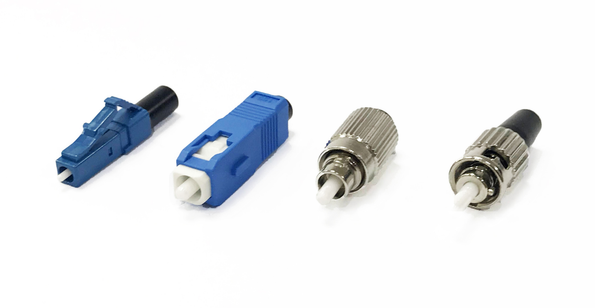
| Connector type | Match the LC, SC, FC or other required interface. |
| End-face polish | Match APC with APC and UPC with UPC. Do not directly mate APC and UPC. |
| Fiber compatibility | Confirm support for the system’s single-mode or multimode fiber. |
| Operating wavelength | Check that the specified range covers the light reaching the port. |
| Return loss | When expressed as a positive dB value, a higher number means less reflected power. |
| Optical power | Keep the incoming power within the terminator’s specified rating. |
Connector fit alone is not enough. A terminator with the correct interface may still be unsuitable for the system’s wavelength or power level.
For an SC/APC connection, review the SC/APC singlemode fiber optic terminator. For an LC/APC connection, check the LC/APC singlemode fiber optic terminator. Compare the complete specifications with your application before ordering.
5. What Should You Check Before Installation?
Use the equipment manufacturer’s installation procedure, including these basic checks:
- Disable the relevant optical sources and verify that the fiber is not carrying light before inspecting the connection.
- Inspect the mating end faces. Clean them if necessary, then inspect again before connecting.
- Confirm interface compatibility and connect the terminator without forcing it.
- Verify system operation using the equipment’s recommended checks.
A terminator controls reflections at the endpoint where it is installed. It does not correct dirty connectors, damaged fiber or reflections elsewhere in the optical path.
6. Choose According to the Port’s Role
Use a fiber optic terminator when an unused optical connection needs a low-reflection ending. Start with the system’s requirements, then match the interface, wavelength and power specifications.