FREE SHIPPING On Orders Over US$200
As data centers migrate to 100G, 200G, 400G, and higher-speed optical networks, MTP/MPO connectors are increasingly used to provide compact, high-density multifiber connectivity.
Their density is a major advantage—but it also makes connector cleanliness especially important.
An MPO ferrule may contain 8, 12, 16, 24, 32, or more fibers within a single interface. A small particle, oil film, or residue on the ferrule can affect one or several optical channels, increasing insertion loss, degrading return loss, or causing intermittent link failures.
The correct maintenance procedure is not simply to clean every connector repeatedly. The recognized best-practice workflow is:
Inspect → Clean if necessary → Inspect again → Connect
This guide explains how to inspect and clean exposed MTP/MPO connectors, connectors installed inside adapters, pinned and unpinned ferrules, and both UPC and APC interfaces.
MPO vs. MTP: Is There a Difference?
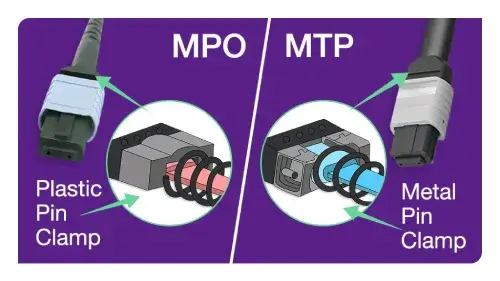
MPO stands for multi-fiber push-on and refers to the standardized multifiber connector format.
MTP® is a US Conec brand of high-performance MPO connector. MTP connectors comply with applicable MPO interface standards and can mate with standards-compliant generic MPO connectors. Therefore, the same general inspection and cleaning principles apply to both MPO and MTP interfaces.
Because the name MTP is a registered brand, “MTP/MPO connector” is commonly used when discussing the broader group of multifiber push-on connectors.
Why Are Clean MTP/MPO Connectors So Important?
Contamination is one of the most common causes of fiber-optic link problems and test failures.
Compared with a single-fiber connector, an MPO connector has a much larger ferrule surface. Dust located away from a fiber core can move across the ferrule during mating and migrate onto one or more fiber end faces.
Contamination may cause:
- Increased insertion loss
- Degraded return loss
- Unstable or intermittent links
- Failure to meet the optical loss budget
- Contamination transfer to the mating connector
- Scratches or permanent end-face damage
- Failed certification or acceptance testing
Cleaning only one side of a connection is also insufficient. A dirty connector can immediately contaminate a clean mating connector. Both sides of the connection—including patch cords, trunk connectors, adapters, transceiver ports, cassettes, and test equipment—must be inspected before mating.
The Golden Rule: Inspect, Clean, and Inspect Again
A connector should not be assumed to be clean merely because it is new, factory terminated, or protected by a dust cap.
Dust caps can contain particles, and contamination may be introduced during manufacturing, packaging, transportation, handling, or previous mating. For this reason, every connector should be inspected before it is connected.
However, inspection does not mean that every connector must automatically be cleaned.
If the end face is inspected and meets the applicable cleanliness criteria, connect it without unnecessary cleaning. Cleaning an already clean connector can introduce static charge, move particles across the ferrule, or expose the end face to contaminated cleaning material.
The recommended workflow is:
- Inspect the entire ferrule and individual fiber end faces.
- If the connector is clean, connect it.
- If contamination is present, clean it using an appropriate MPO cleaning tool.
- Inspect the connector again.
- Repeat with a different cleaning method only if contamination remains.
- Connect the interface immediately after it passes inspection.
IEC 61300-3-35 provides criteria for evaluating scratches and defects in defined regions of fiber connector end faces. Professional inspection equipment can use these criteria to produce repeatable pass-or-fail results.
Safety Before Inspection
Never look directly into the end of an optical fiber or inspect a potentially active fiber with a conventional direct-view optical microscope.
The wavelengths used by many fiber systems are outside the visible spectrum. A fiber may therefore carry optical power even when no light is visible to the human eye.
Before inspecting a connector:
- Disconnect or disable the optical source whenever possible.
- Verify that the fiber is not carrying an active signal.
- Use an appropriate live-fiber detector or optical power meter when required.
- Prefer a video inspection probe that displays the end face on a screen.
- Follow the safety procedures supplied with the network equipment and inspection instrument.
A microscope can concentrate optical energy into the eye, so a live fiber path should never be inspected directly.
Tools Required for MTP/MPO Connector Cleaning
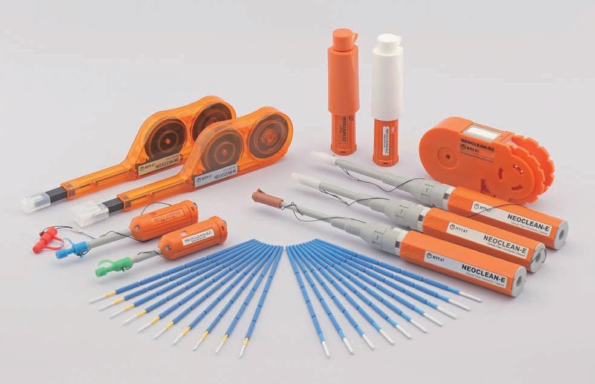
1. MPO Inspection Microscope
An MPO-compatible video microscope allows the technician to inspect the complete rectangular ferrule and then examine individual fibers.
The inspection system should match:
- MPO-8, MPO-12, MPO-16, MPO-24, or another fiber count
- UPC or APC connector geometry
- Exposed plugs or connectors inside adapters
- Pinned or unpinned interfaces
- The required IEC inspection criteria
An APC MPO connector requires an inspection tip designed for its angled end-face geometry. A generic single-fiber microscope tip is not sufficient for evaluating an entire MPO ferrule.
2. MPO One-Push Cleaner
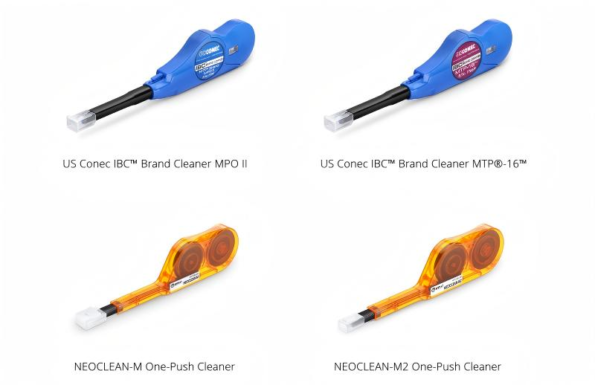
A one-push or one-click MPO cleaner contains a microfibrous cleaning strand that advances across the ferrule when the tool is pressed.
Depending on the model, it can be used for:
- Exposed cable connectors
- Connectors inside MPO adapters
- Pinned male ferrules
- Unpinned female ferrules
- UPC and APC interfaces
The cleaner must match the MPO format. A cleaner designed for MPO-8/12/24 connectors should not automatically be used for MPO-16/32 interfaces.
For example, NTT-AT specifies separate NEOCLEAN-M models for conventional MPO formats and 16-fiber MPO formats. Its MPO cleaner supports plugs and adapter ports, flat and angled end faces, and connectors with or without guide pins.
3. Cassette Cleaner
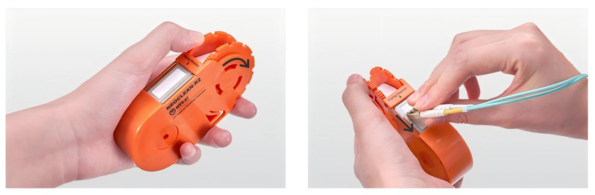
A cassette cleaner uses a reel of lint-free cleaning fabric. It is primarily suitable for exposed connector plugs that can be placed directly against the cleaning surface.
Cassette cleaners are useful in:
- Production lines
- Assembly areas
- Laboratories
- Installation work
- Connector inspection stations
Not every cassette cleaner is suitable for every MPO configuration. Guide pins, ferrule shape, cleaning slot dimensions, and manufacturer instructions must be checked before use.
4. Optical-Grade Wipes and Cleaning Fluid
If dry cleaning does not remove oil, grease, or stubborn residue, use a lint-free optical-grade wipe with a small amount of fiber-optic cleaning fluid.
The cleaning fluid should be specifically formulated or approved for optical connector end faces.
Avoid:
- Facial tissues
- Paper towels
- Ordinary cotton swabs
- Reused wipes
- Household glass cleaner
- Excessive solvent
- Unverified cleaning chemicals
General-purpose wipes and cotton products can leave fibers or residue on the ferrule.
5. MPO-Compatible Port Cleaning Tools
A connector installed inside an adapter, cassette, transceiver port, or equipment interface cannot usually be cleaned with a flat cassette.
Use a pen-style cleaner or another tool specifically designed to reach the connector through the adapter.
The tool attachment must fit the adapter without forcing, tilting, or scraping the ferrule.
Method 1: Cleaning an Exposed MTP/MPO Connector
Use this procedure for an MPO connector that has been disconnected and is directly accessible.
Step 1: Remove the Dust Cap
Remove the cap without touching the ferrule, guide pins, or connector end face.
Do not assume that the connector is clean after removing the cap.
Step 2: Inspect the End Face
Use an MPO-compatible video microscope to inspect:
- The complete ferrule surface
- All active fiber positions
- Areas around the guide-pin holes
- The region between adjacent fibers
- Visible scratches, particles, oil, and residue
If the end face passes inspection, do not clean it unnecessarily.
Step 3: Perform Dry Cleaning
Use a compatible MPO one-push cleaner or cassette cleaner.
For a pen-style cleaner:
- Install the correct plug-cleaning attachment when required.
- Insert the connector straight into the cleaner.
- Press until the mechanism completes one cleaning cycle.
- Remove the connector without rotating or dragging it against the tool.
For a cassette cleaner:
- Expose a fresh section of cleaning fabric.
- Hold the connector perpendicular to the cleaning surface.
- Draw the ferrule across the fabric in the indicated direction.
- Use one smooth, controlled movement.
- Do not scrub backward and forward.
- Do not reuse a contaminated section of tape.
Step 4: Inspect Again
Inspect the connector immediately after cleaning.
Do not assume that a click from the cleaning tool confirms a clean end face. Cleaning can move contamination from one fiber position to another, especially across a large multifiber ferrule.
Step 5: Escalate if Necessary
If dry cleaning does not remove the contamination, use the wet-to-dry procedure described below.
If repeated cleaning does not remove a visible mark, it may be a scratch, pit, embedded particle, or other permanent defect rather than removable contamination.
Method 2: Cleaning an MPO Connector Inside an Adapter
Use a compatible MPO port cleaner for connectors installed inside:
- MPO adapters
- Patch panels
- Cassettes
- Optical modules
- Equipment ports
The general procedure is:
- Confirm that the port is not carrying an active optical signal.
- Inspect the connector using an MPO port inspection tip.
- Remove the plug-cleaning cap or attachment from the one-push cleaner if required.
- Insert the cleaner straight into the adapter.
- Press until one complete cleaning cycle is performed.
- Remove the cleaner without twisting it.
- Inspect the connector again.
- Connect only after the end face passes inspection.
Do not force the cleaner into an incompatible adapter. Excessive force or misalignment can damage the cleaning tool, adapter, guide pins, or ferrule.
Fluke’s MPO cleaning procedure similarly distinguishes between cleaning an exposed cable connector and cleaning a connector through a bulkhead adapter.
Method 3: Wet-to-Dry Cleaning for Stubborn Contamination
Dry cleaning is normally the first cleaning method because it is fast and convenient. However, dry cleaning may not completely remove:
- Fingerprint oil
- Grease
- Adhesive residue
- Dried liquid residue
- Heavily embedded contamination
In these cases, an approved wet-to-dry process may be more effective.
Wet-to-Dry Procedure
- Place a clean optical-grade wipe on an appropriate cleaning surface.
- Apply a minimal amount of approved fiber-optic cleaning fluid to one area of the wipe.
- Keep an adjacent area of the wipe dry.
- Hold the MPO connector perpendicular to the wipe.
- Move the ferrule once from the lightly wetted area into the dry area.
- Do not move the connector back into the wet section.
- Do not scrub backward and forward.
- Inspect the end face immediately.
- Repeat only with a new section of wipe if necessary.
The movement from wet to dry helps the solvent loosen contamination while the dry section removes dissolved residue and remaining moisture.
Corning and Fluke both recognize dry, wet, and wet-to-dry methods as valid connector-cleaning approaches when appropriate optical-grade materials are used.
Is Isopropyl Alcohol Safe for MPO Connectors?
High-purity isopropyl alcohol has historically been used for optical connector cleaning, but it must be applied correctly and permitted by the component or cleaning-tool manufacturer.
The main risks are not that all alcohol is inherently corrosive. Problems are more likely to result from:
- Low-purity alcohol containing excessive water
- Too much liquid on the connector
- Solvent remaining on the ferrule
- Residue from additives or contaminated containers
- Cleaning without a final dry step
- Reusing a contaminated wipe or swab
Where possible, use a purpose-designed fiber-optic cleaning fluid and follow the connector manufacturer’s cleaning instructions.
Never soak or flood an MPO connector.
Pinned vs. Unpinned MPO Connectors
MPO connectors may be:
- Pinned, commonly described as male
- Unpinned, commonly described as female
The guide pins help align the two ferrules during mating. They also create additional surfaces around which contamination can collect.
A suitable MPO cleaning tool should clean the complete ferrule without being obstructed by the pins. Many model-specific one-push cleaners support both pinned and unpinned connectors, but this capability must be verified before use.
Do not assume that every cassette or pen cleaner supports both connector genders.
UPC vs. APC MPO Connectors
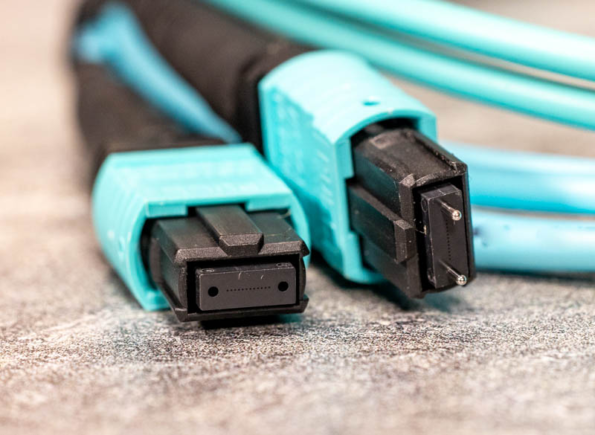
MPO connectors may have flat/UPC-style or angled/APC end faces.
Single-mode MPO systems commonly use angled physical-contact interfaces, while many multimode MPO systems use flat or UPC-style interfaces. The actual polish must be verified from the product specification.
Cleaning and inspection equipment must accommodate the connector geometry:
- Use an APC-compatible microscope tip for angled connectors.
- Use a cleaning tool approved for the relevant polish.
- Never mate an APC MPO connector with an incompatible flat/UPC MPO interface.
The cleaner may support both geometries, but the microscope tip frequently needs to match the end-face angle.
Common MTP/MPO Cleaning Mistakes
Cleaning Without Inspecting
Blind cleaning does not confirm whether the connector was dirty or whether the cleaning process succeeded.
Inspect first and clean only when necessary.
Skipping the Second Inspection
A cleaner can move a particle from the ferrule surface onto a fiber core. The connector must be inspected after every cleaning attempt.
Using the Wrong MPO Cleaner
MPO-12 and MPO-16 interfaces have different fiber arrangements. Use a cleaner designed for the connector’s fiber count and ferrule format.
Reusing Dirty Cleaning Material
A used wipe or exposed cassette section can transfer contamination back onto the connector.
Always use a fresh cleaning area.
Moving Back and Forth
Scrubbing the connector repeatedly can redistribute particles and increase the risk of scratching the ferrule.
Use a single direction according to the cleaning-tool instructions.
Using Too Much Solvent
Excess liquid can spread contamination, enter the connector housing, or leave residue.
Use only the minimum amount required.
Touching the Ferrule
Fingerprints contain oil and particles that are difficult to remove. Never touch the end face or guide pins.
Trusting the Dust Cap
A dust cap protects the connector mechanically, but it does not certify cleanliness. Inspect the connector whenever the cap is removed.
Cleaning Only One Side
A clean connector can be contaminated immediately by a dirty adapter, transceiver port, or mating connector.
Inspect both sides before mating.
Inspecting a Live Fiber
Never inspect a fiber until the optical source has been disabled or the absence of optical power has been verified.
How Often Should MTP/MPO Connectors Be Cleaned?
MTP/MPO connectors do not need to be cleaned according to a fixed daily, weekly, or monthly schedule.
They should be inspected:
- Before initial mating
- After removing a dust cap
- After disconnecting and reconnecting a link
- Before optical loss testing
- During troubleshooting
- After handling or exposure to an uncontrolled environment
- Before connecting test equipment
- Whenever unexpected insertion loss is detected
Clean the connector only when inspection shows contamination or when manufacturer procedures specifically require cleaning.
A fiber system that remains connected and performs normally should not be disconnected solely for routine cleaning. Unnecessary disconnection introduces another opportunity for contamination or damage.
MTP/MPO Cleaning Checklist
Before completing the connection, verify the following:
- The optical source is disabled or the fiber is confirmed safe.
- The inspection tip matches the MPO format and polish.
- The entire ferrule and all active fibers have been inspected.
- The cleaning tool matches the fiber count and connector geometry.
- A fresh cleaning surface has been used.
- Both sides of the connection have been inspected.
- Wet cleaning, when required, was followed by a dry step.
- No solvent residue remains.
- The connector has passed the final inspection.
- The connector is mated immediately or protected with a clean cap.
Conclusion
Reliable MTP/MPO connectivity depends on more than selecting a low-loss cable assembly. Connector cleanliness must be controlled during installation, testing, maintenance, and every connection change.
The most effective process is not repeated cleaning without verification. It is a disciplined inspection workflow:
Inspect first. Clean only when necessary. Inspect again before mating.
A dedicated MPO inspection microscope, a correctly matched one-push or cassette cleaner, and optical-grade wet-to-dry materials can remove most common contaminants without damaging the ferrule.
Technicians should also verify connector fiber count, pinned or unpinned configuration, UPC or APC geometry, and whether the connector is exposed or located inside an adapter before choosing a cleaning tool.
Following these practices reduces avoidable insertion loss, prevents contamination transfer, protects expensive optical equipment, and improves the long-term reliability of high-density fiber links.